Google just closed a gap that social media managers and SEOs have complained about for years: you could see how people engaged with your posts inside Instagram or TikTok, but you had no idea whether Google Search was sending anyone there in the first place.
On July 7, 2026, Google introduced Platform Properties — a new property type inside Search Console that lets you connect Instagram, TikTok, X, and YouTube accounts and see how that content performs directly in Google Search and Discover.
I connected mine the same week it rolled out. Here’s my honest take, a step-by-step walkthrough of how the connection process actually works, and what I’m telling clients and students to do about it.
My First Reaction: Skeptical, Then Sold
I’ll be upfront — my first reaction wasn't excitement, it was skepticism. Another "property type," another dashboard, another thing to check. I've seen enough Search Console additions come and go without changing how I actually work.
What changed my mind was realizing what this actually measures. Views and follower counts were never the number that mattered to me. What matters is which keywords are driving someone from a Google search straight to a piece of content. Platform Properties answers that question directly, and it answered it fast.
This isn't a gimmick. It's a genuine feature that helps SEOs identify which content creators actually move the needle for a brand collaboration. If a brand works with an influencer, the brand can now see the real search behavior and organic clicks that influencer's content generates from the SERP — not just the vanity engagement metrics the creator reports back.
Setting It Up Was Genuinely Easy (Step-by-Step Walkthrough)
I connected Instagram, X (Twitter), and YouTube immediately. If you’ve ever set up a domain property in Search Console, this is significantly faster — no DNS records, no code snippets, and no waiting around for ownership file verification.
Here is exactly how the flow works step-by-step:
Step 1: Select the New Property Type
When you click your property list inside Search Console, you'll see an updated menu. Under the traditional "Add a website" option, Google has added a dedicated "New" section featuring four social platforms: Instagram, TikTok, X, and YouTube.
Step 2: Authenticate Your Accounts
Each platform uses direct OAuth authorization, meaning you just log in through the official platform pop-up window:
-
Instagram: Clicking "Add" opens a secure Instagram authentication modal (
instagram.com/accounts/login). Once you log into your profile (e.g.,@sanoop_balan_seo), Search Console requests authorization to read public performance data. -
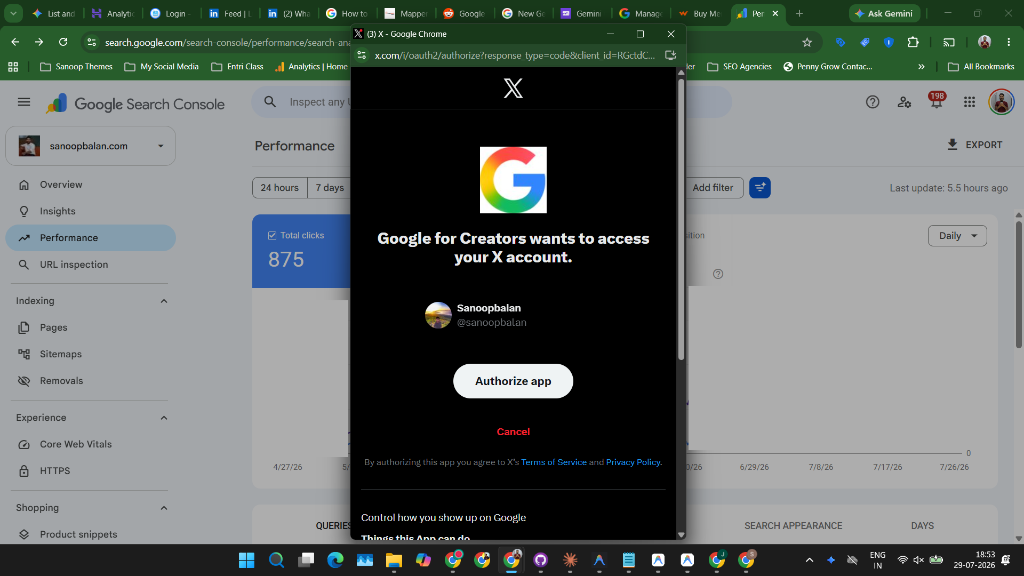
X (Twitter): You'll be redirected to authorize an app named Google for Creators (
x.com/i/oauth2/authorize). Simply click "Authorize app" to grant permission to your X account (e.g.,@sanoopbalan).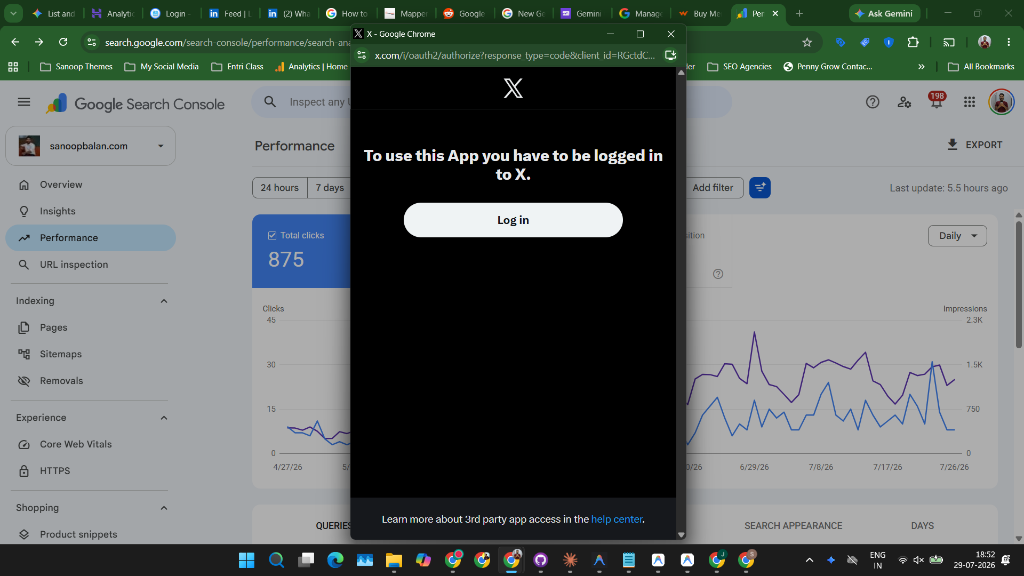
-
YouTube: Because YouTube is tied directly to Google, Search Console automatically detects channels connected to your Google account email. A modal displays your eligible channels (e.g.,
@officememes,@sanoopbalan-123,@Manifold-KPSC), letting you select the specific channel you want to track.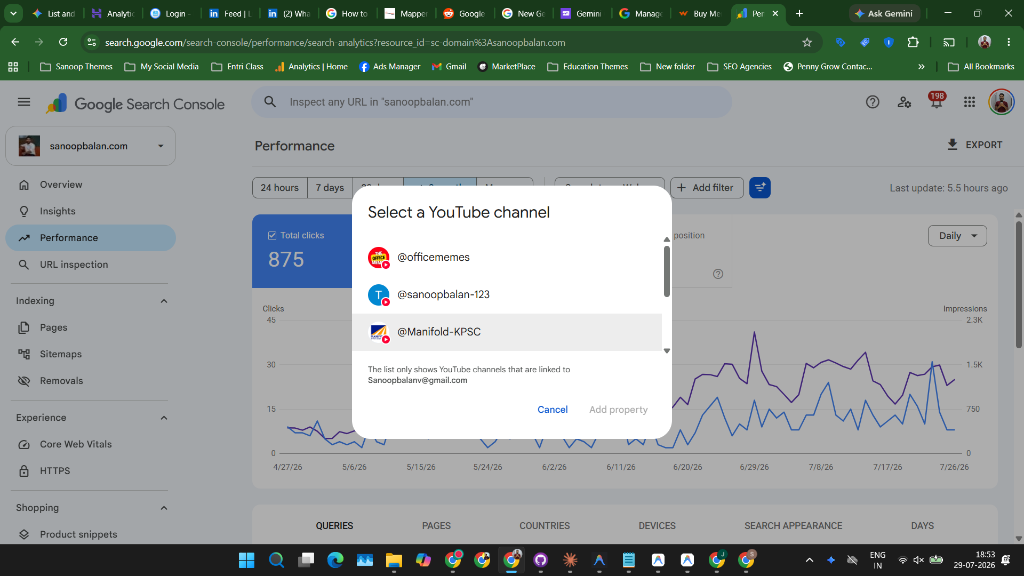
Step 3: Wait for the 48-Hour Sync
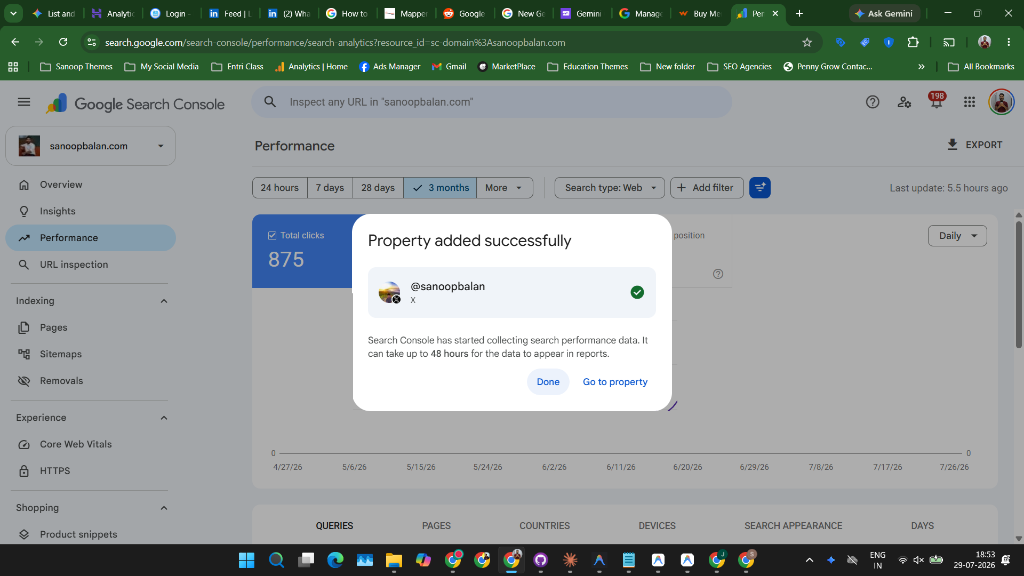
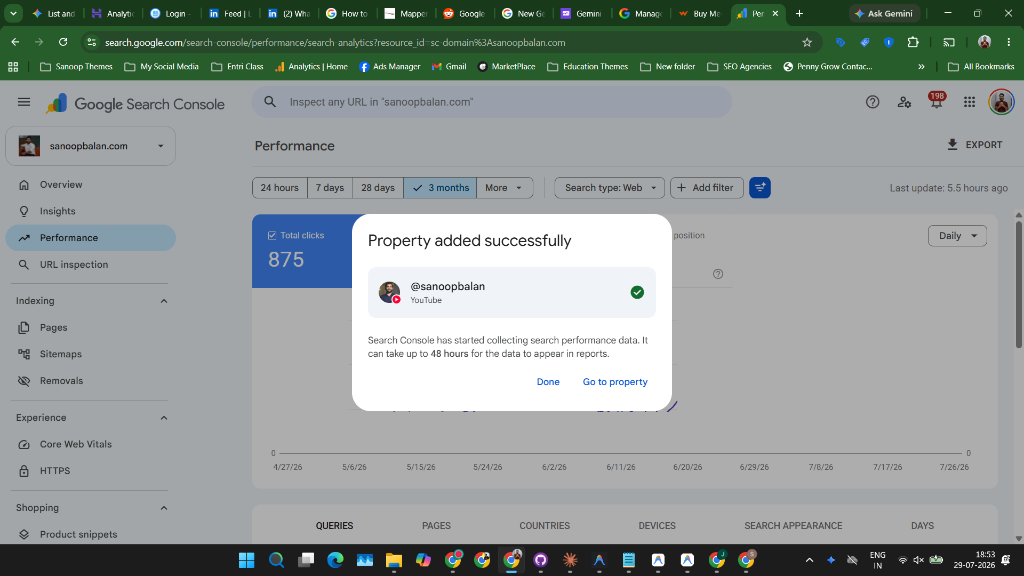
Once you confirm, Search Console displays a brief "Adding property" progress status followed by a confirmation modal:
"Property added successfully"
Search Console has started collecting search performance data. It can take up to 48 hours for the data to appear in reports.
What the Initial Setup Revealed
Once the connection was confirmed, a few immediate takeaways stood out:
- Real Search Clicks: Several of my posts were pulling organic clicks directly from Google search results — not just impressions.
- Brand Search Reach: My brand name itself was generating search clicks that landed straight on my social profiles rather than my domain. That’s an organic footprint I hadn't accurately quantified before.
Views were never my primary metric. Keyword-driven intent is. And for the first time, we can track social search intent inside the same GSC dashboard we already check every day.
Why This Matters for Brands, Agencies, and Creators
The biggest shift here is strategic, not technical. Once accounts are connected, you can finally understand the search intent behind each piece of social content you publish.
For agencies managing client accounts, this changes client reporting completely:
Who Benefits Most Right Now
Based on early performance, the businesses that should act on this immediately are those where social content and search intent overlap heavily:
- Education: Course and training searches often start with social video tutorials before users convert on a website.
- E-commerce: Product discovery content on Instagram and TikTok showing up in visual SERPs.
- Local Service Businesses & Salons: High-intent local searches often surface social profiles and portfolios directly.
- Hospitality: Hotels, resorts, and destination venues live on visual discovery. Guests frequently search brand names alongside experience keywords before booking.
What I Wish Google Had Included
The main gap right now is missing platform support. Facebook and LinkedIn aren't included in this initial rollout. For B2B companies and personal brands, LinkedIn is where the primary search traffic lands. I'll be adding LinkedIn tracking the moment Google extends support to it.
Is the Data Reliable?
Yes. Because the data originates directly from Google's index, it carries the same accuracy as standard Search Console performance reports.
Just keep in mind the 48-hour onboarding delay flagged during setup — give the property a couple of days post-connection before expecting populated click and impression metrics.
What Google Gets Out of This
Why did Google build this? It’s a win on two fronts:
- For Creators & Marketers: It gives clear visibility into SERP-driven social discovery.
- For Google: It pulls social and video content performance firmly into Google’s analytical ecosystem, solidifying Google Search and Discover as the definitive place where content visibility is measured.
My Recommended Workflow Going Forward
Here is the exact action plan I'm running for my clients:
- Connect Every Account Immediately: Platform properties do not retroactively backfill historical search data. The longer you wait, the more data you lose.
- Review Clicks Weekly: Social timelines move quickly. A weekly pulse check captures rising search queries while they are still actionable.
- Analyze Content Post-by-Post: Don't just check total channel clicks. Look at individual post URLs to identify which topics earn SERP positions, then double down on those formats.
Where This Is Headed
Over the next 6–12 months, expect deeper integration between standard website properties and social Platform Properties — allowing us to map full search journeys across owned websites and social channels under a single dashboard.
My advice is simple: connect your accounts today.
Need help setting this up?
Want to connect your social profiles to Search Console and turn this search data into a high-converting content strategy? That’s exactly what I do for brands and businesses across Kerala and the GCC. Reach out to connect!