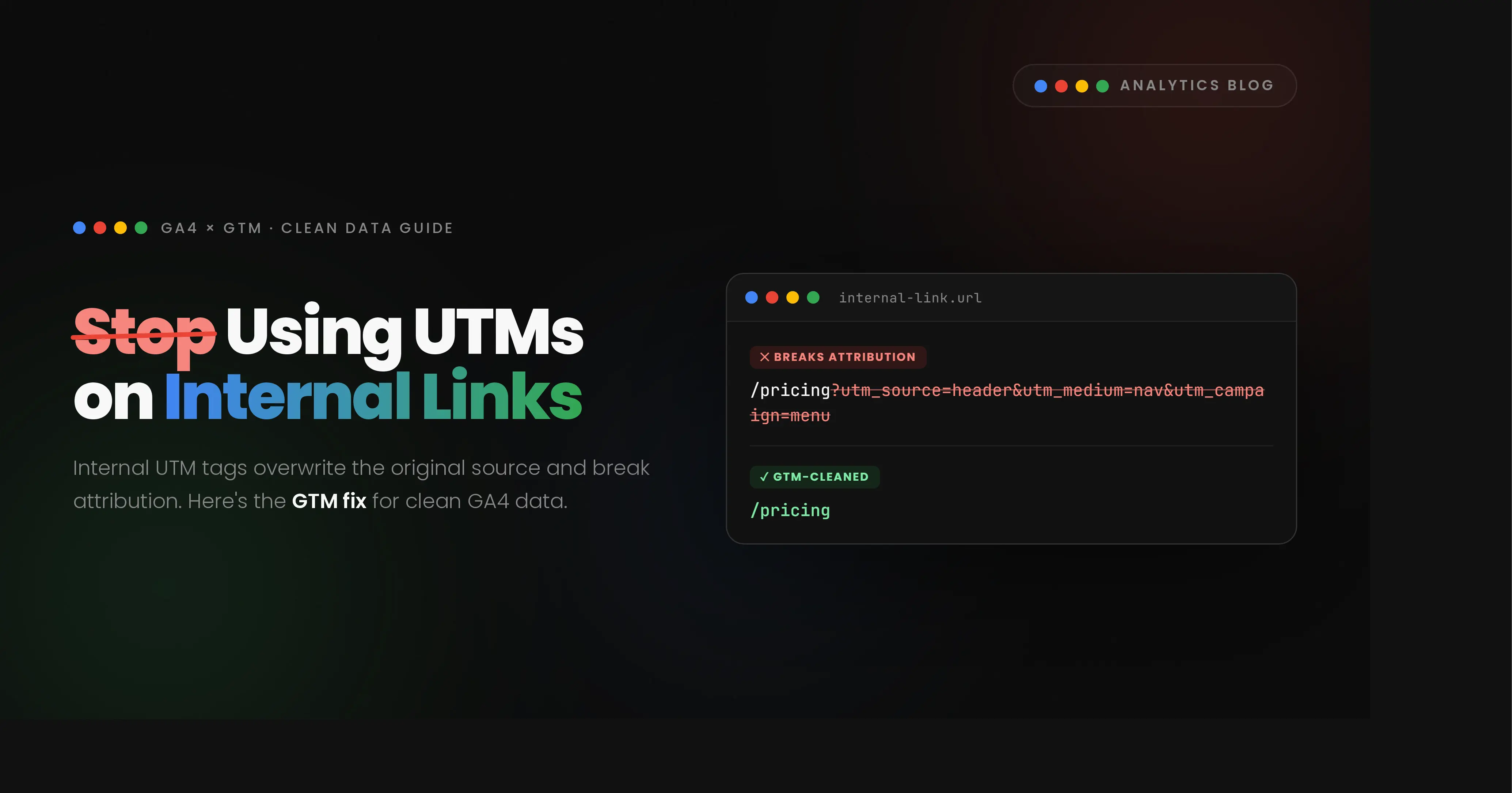
Here's a mistake I see even experienced marketers make: they treat every link on their own website like it's
a billboard on someone else's property. A user lands on your blog
directory page, you want to know which post they clicked, so the instinct is to tag the link —
utm_source=blog_index&utm_medium=card — and move on. It feels logical. It is also, quietly,
one of the more damaging habits in GA4 measurement.
The problem isn't the intention. Knowing which blog cards get clicked is exactly the kind of signal that should shape your content calendar. The problem is the mechanism. UTM parameters were built to describe where a visitor came from before they ever touched your domain — an email campaign, a paid ad, a partner referral. They were never designed to describe what a visitor does after they've already arrived. Using them internally asks GA4 a question it was never built to answer, and it answers wrong.
Why Internal UTMs Quietly Break Your Attribution
GA4 attribution runs on session-scoped parameters. The moment a session is stamped with a new
utm_source, GA4 treats that as a new acquisition event — even mid-session, even if the visitor
never left your domain. That creates two specific failure modes.
1. Attribution Overwrite
A visitor arrives from Google Organic Search. GA4 correctly logs the session source as
google / organic. Two minutes later, they click a blog card tagged
utm_source=blog_index. GA4 rewrites the session's source to "blog_index" — and the search visit
that actually brought them to your site is gone from the report. Multiply that across a few hundred sessions a
month and your organic search performance starts looking artificially weak, while an acquisition channel that
never existed ("blog_index") starts showing phantom traffic. Anyone making budget or content decisions off
that report is working from a distorted picture.
2. URL Pollution
The second failure is slower but just as costly. If a visitor copies that UTM-tagged URL from their address bar and shares it on WhatsApp or LinkedIn — which happens constantly with blog content — every future visit through that shared link gets attributed to "blog_index" too, permanently, regardless of where the share actually originated. Your internal tracking tag has now leaked into your external attribution data, and there's no clean way to unwind it after the fact.
Both problems share a root cause: UTMs are a property of the URL, and URLs don't stay where you put them.
The Fix: Track the Click, Not the URL
The clean alternative is to leave every internal link exactly as it is and capture the click as a behavioral event instead, using Google Tag Manager. No code changes on the site, no altered URLs, and GA4's acquisition reports stay accurate because the traffic source is never touched. Here's the three-step setup I use for dynamic blog layouts — cards with nested images, headings, and category badges — where a visitor might click any part of the card.
Step 1 — Build a "Blog Card Click" Trigger
Since a click could land on the image, the title, or the badge inside the card, the trigger needs to catch all of them, not just the anchor tag itself.
- Trigger Type: Click – Just Links
- Fires on: Some Link Clicks
- Condition:
Click Elementmatches CSS selector.blog-card, .blog-card *
Step 2 — Add Two Custom JavaScript Variables
Because the click can register on a nested element, the built-in {{Click Text}} variable often
returns blank. These two variables walk up the DOM from whatever was clicked to the parent card, then pull the
exact title and category from it.
Create a Custom JavaScript variable named {{CJS - Clicked Blog Title}}:
function() {
  var element = {{Click Element}};
  var card = element.closest('.blog-card');
  if (card) {
    var h3 = card.querySelector('h3');
    return h3 ? h3.innerText.trim() : '';
  }
  return '';
}
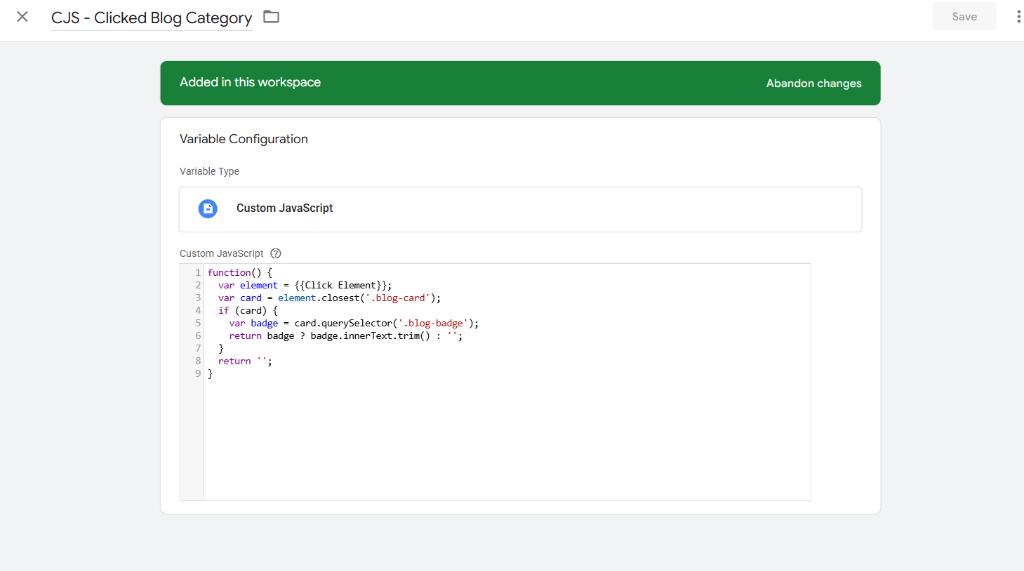
Create another Custom JavaScript variable named {{CJS - Clicked Blog Category}}:
function() {
  var element = {{Click Element}};
  var card = element.closest('.blog-card');
  if (card) {
    var badge = card.querySelector('.blog-badge');
    return badge ? badge.innerText.trim() : '';
  }
  return '';
}
Step 3 — Configure the GA4 Event Tag
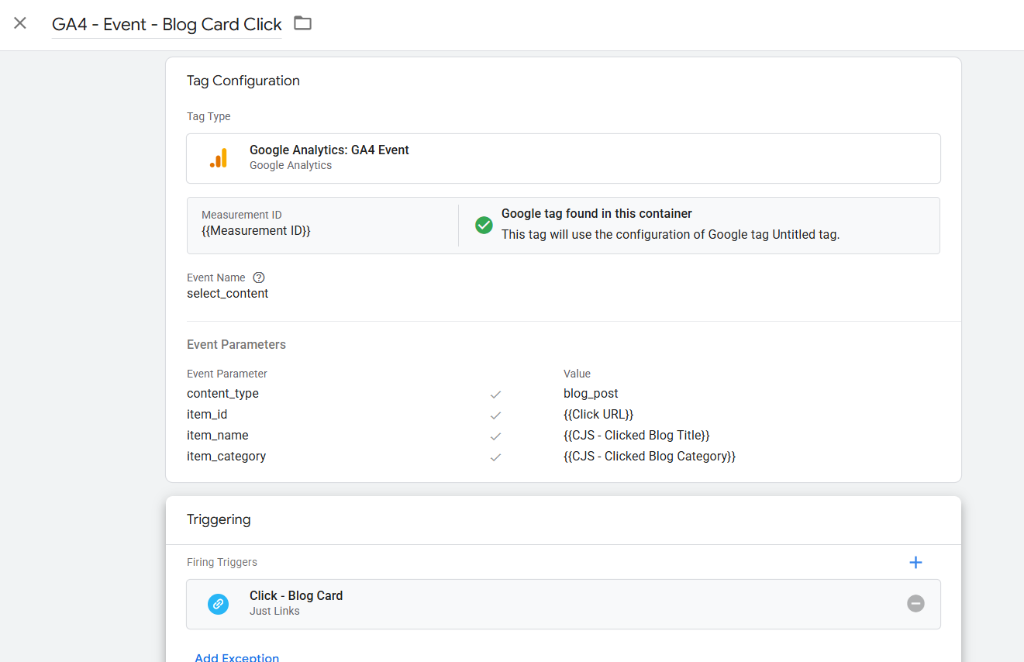
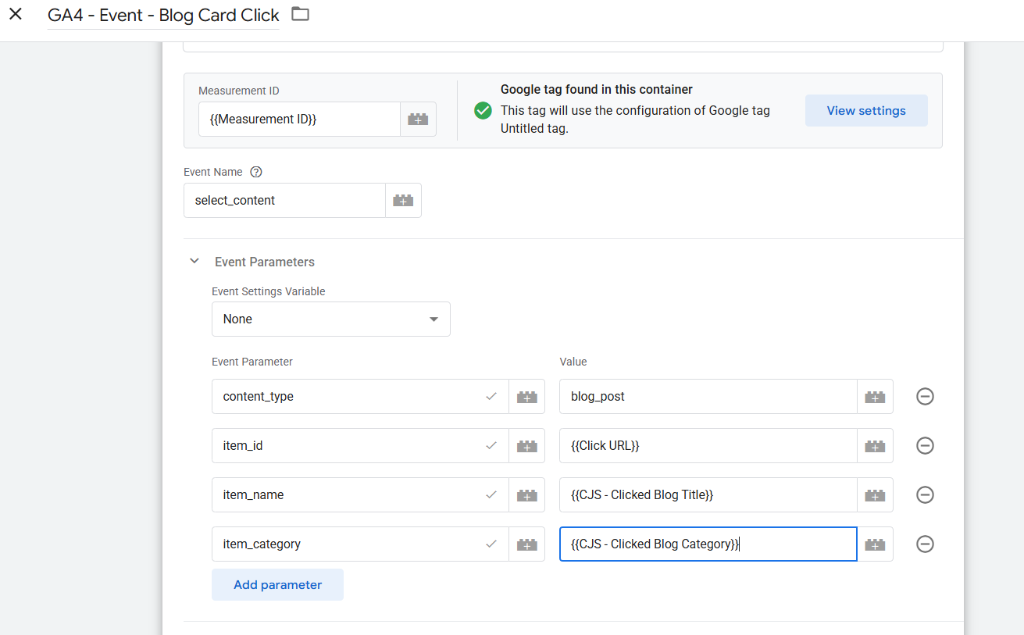
Map the trigger and variables into a standard GA4 event rather than inventing a custom one — Google's own recommended events get better default reporting in GA4's standard panels.
- Event Name:
select_content - Event Parameters:
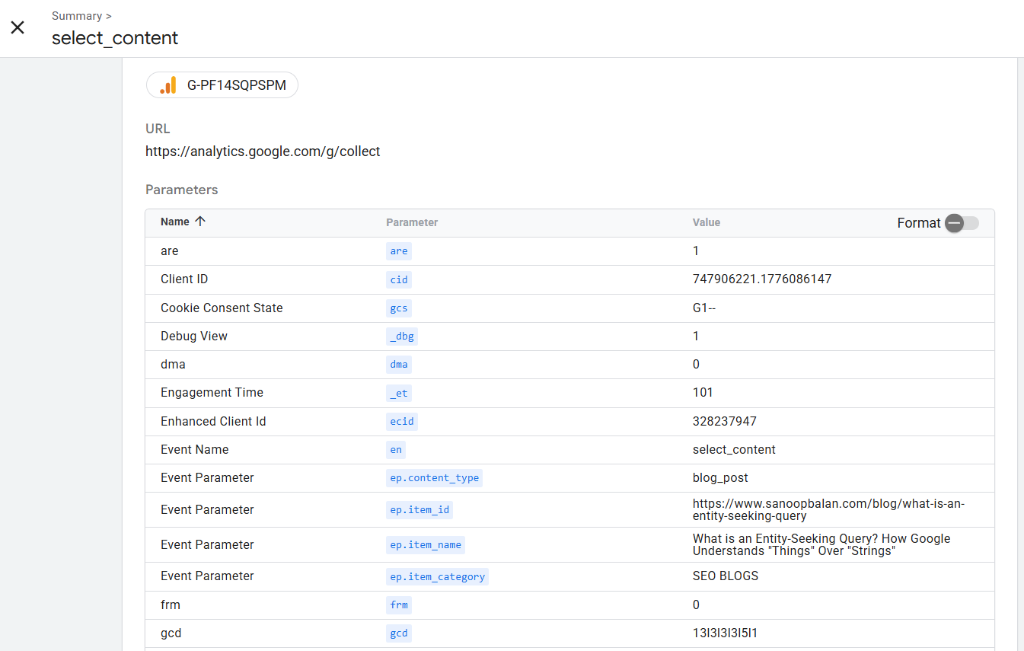
content_type:blog_postitem_id:{{Click URL}}(the relative path, unmodified)item_name:{{CJS - Clicked Blog Title}}item_category:{{CJS - Clicked Blog Category}}
The result: every card click sends a clean select_content payload with the exact title and
category attached, the URL in the address bar never changes, and your acquisition reports keep telling the
truth.
When verified in Tag Assistant, you will see the select_content event fired along with the page
views on click:
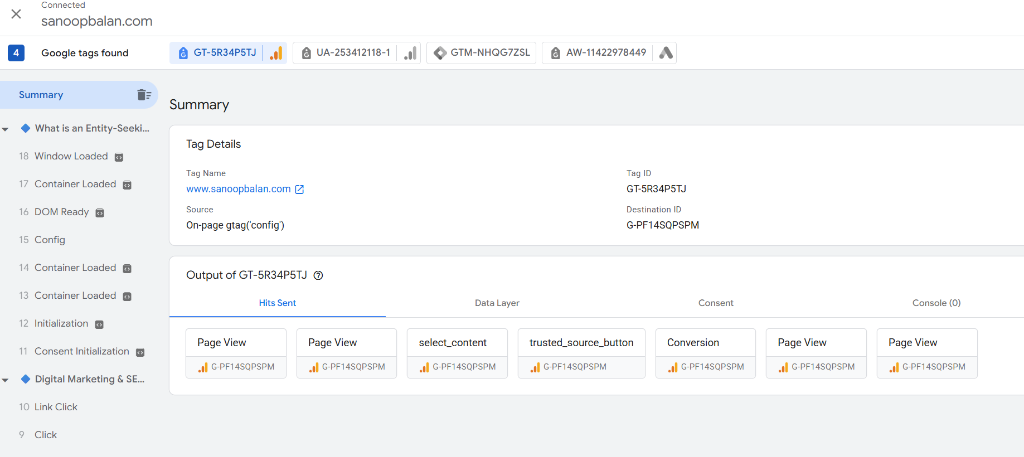
And GA4 receives the detailed parameters exactly as mapped:
Why This Matters Beyond the Analytics Dashboard
This is the part that gets skipped in most "GTM setup" tutorials: clean tracking isn't a vanity exercise, it's what makes content decisions defensible. If you're running local SEO, decisions about which service page to expand, which blog topic to double down on, or which city page needs more internal links all trace back to data like this. When the underlying acquisition data is corrupted by well-meaning UTM tags, every downstream decision inherits that error. This is exactly the kind of implementation detail a properly engaged SEO expert in Kerala should be catching before it skews six months of reporting — technical correctness underneath the content strategy, not just keyword placement on top of it.
It also connects directly to how AI systems and answer engines read your site. Clean, standard GA4 events and consistent internal linking make it easier to prove which content earns engagement — evidence you can then use to strengthen the pages an entity-seeking or natural language queries query is most likely to surface, which is the same principle behind treating your site as a connected knowledge graph rather than a stack of isolated pages. You can review how we track and prove similar search enhancements in our local SEO case studies.
Frequently Asked Questions
Do UTM parameters on internal links hurt SEO rankings directly?
Not through a ranking penalty — Google can generally handle parameterized URLs. The damage is to your own measurement: attribution overwrite and URL pollution corrupt the data you'd use to make SEO and content decisions, which is an indirect but real cost.
Is it ever acceptable to use UTM tags internally?
Rarely, and only in very contained cases — for example, a single tracked banner you fully control and never expect to be shared or bookmarked. As a default rule for blog cards, navigation, and any link a user might revisit or share, avoid UTMs entirely and use GTM event tracking instead.
What is the real difference between UTM tracking and GTM event tracking?
UTMs modify the URL itself and describe where a session came from. GTM event tracking observes what a visitor does after arriving and reports it as a behavioral event, without altering the URL or the session's original source. For anything happening inside your own domain, event tracking is the correct tool.
Will adding this GTM setup slow down page load or affect Core Web Vitals?
No. Click triggers and Custom JavaScript variables fire on interaction, not on page load, so they don't add to initial render time or affect LCP, CLS, or INP in any measurable way.
The Rule of Thumb
Save UTM parameters strictly for traffic entering your domain from somewhere else — an email send, a paid campaign, a partner's newsletter. For anything happening inside your own domain, track the click, not the URL. It's a small distinction that protects months of acquisition data from quietly going wrong. If you need assistance setting up advanced custom tracking structures for your brand, consulting with a digital marketing strategist in Kozhikode can ensure your configuration maps directly to your key performance indicators.