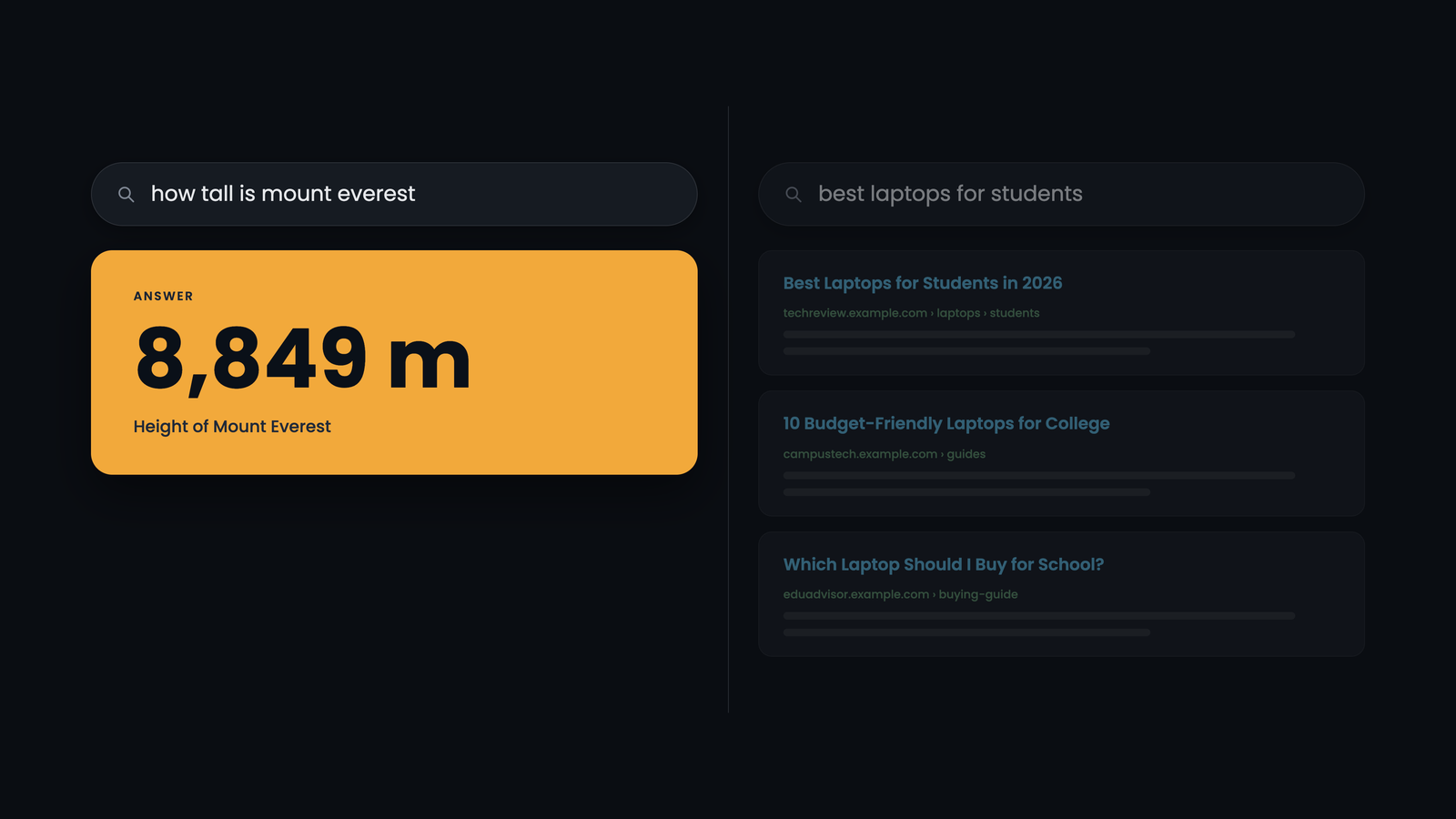
Type "how tall is Mount Everest" into Google and you won't need to click anything. The answer, 8,849 metres, is sitting right there at the top of the page.
Now type "best laptops for students." No single answer appears. Instead you get a list of reviews, shops and comparison guides.
Same search box. Same search engine. Two completely different responses. The difference comes down to one decision Google makes in a fraction of a second: is this person looking for an answer, or looking for options?
That decision has a name. It's called an answer-seeking query, and understanding it changes how you should write almost every page you publish.
What Is an Answer-Seeking Query?
Quick definition
An answer-seeking query is a search where the user expects one short, direct answer, such as a date, a number, a definition, a yes or no, or a short set of steps. Google identifies these queries and tries to show the answer itself, pulled from a passage on a web page, instead of only a list of links.
The term comes straight from Google. It appears in a Google patent titled Generating Elements of Answer-Seeking Queries and Elements of Answers, which describes how the search engine recognises these queries and how it chooses the passage that answers them.
The patent's own example is simple. Someone searching "when was george washington born" is almost certainly looking for one fact: February 22, 1732. They don't want ten articles about Washington's life. They want the date.
Everyday examples of answer-seeking queries
| What the user wants | Example query | The short answer |
|---|---|---|
| A date | when was the first iPhone released | June 29, 2007 |
| A measurement | how tall is mount everest | 8,849 metres |
| A definition | what is compound interest | Interest earned on both your original money and the interest it has already earned |
| A yes or no | can dogs eat grapes | No. Grapes are toxic to dogs |
| A short process | how to boil an egg | A few ordered steps |
| A name | who painted the mona lisa | Leonardo da Vinci |
The One-Answer Test: Answer-Seeking vs Everything Else
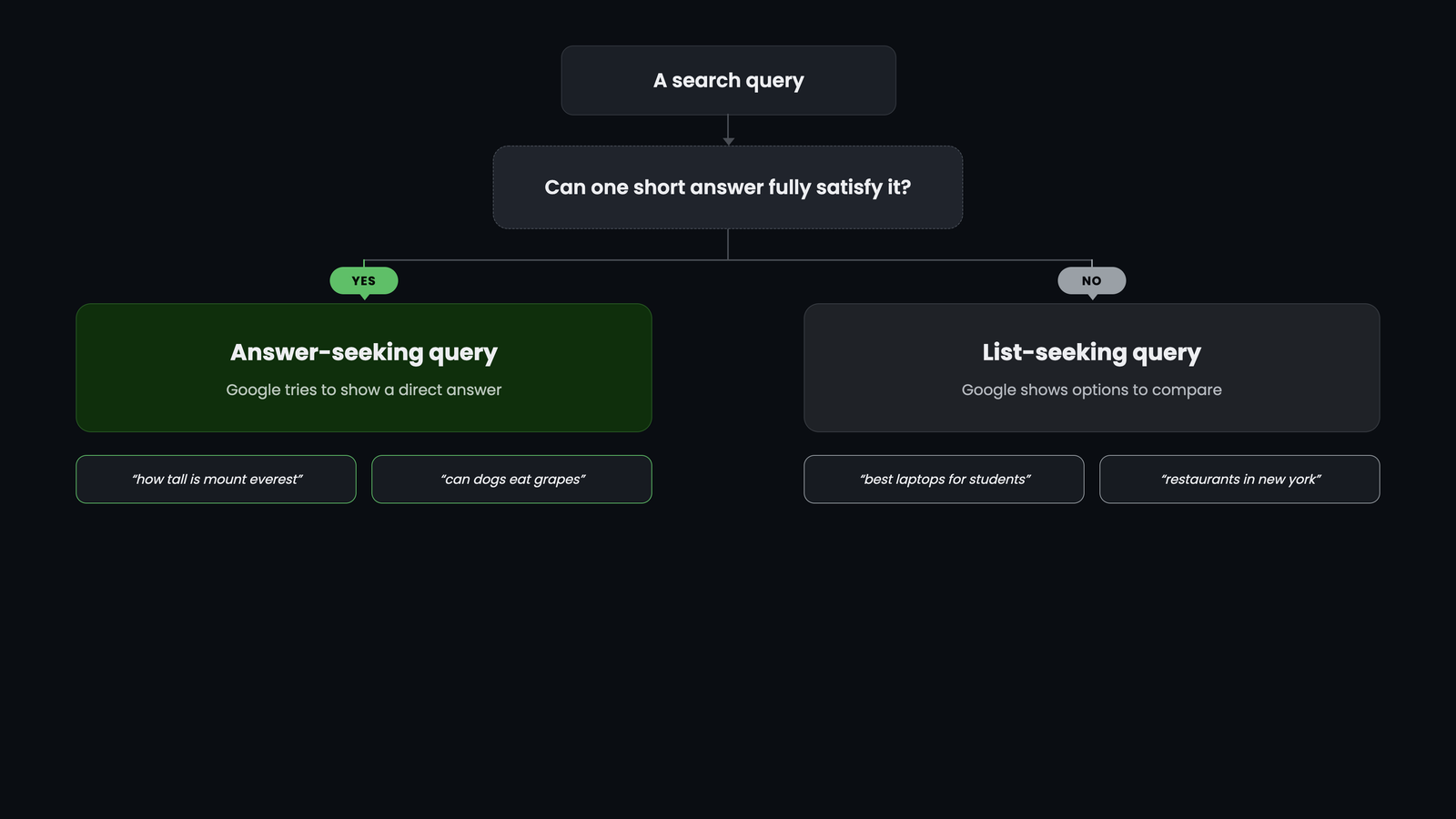
Not every search wants a direct answer. The patent is very clear on this. It explains that a query like "restaurants in new york" is not answer-seeking, because the person isn't expecting one concise answer. No single answer exists. They want a range of options to compare.
That gives us the simplest test you can apply to any keyword:
The one-answer test
If one short answer can fully satisfy the search, it's answer-seeking.
If the searcher wants a list to choose from, compare, or browse, it isn't.
| Answer-seeking (one answer) | Not answer-seeking (many results) |
|---|---|
| what is the boiling point of water | best kitchen kettles |
| how many ounces in a cup | measuring cup sets |
| who wrote pride and prejudice | books like pride and prejudice |
| what does HTTP stand for | web development courses |
| what time does the museum close | things to do this weekend |
A common misunderstanding: "local" doesn't mean "not answer-seeking"
Because the patent's example happens to mention a city, it's easy to assume that location-based searches are never answer-seeking. That's not the rule.
"What time does the museum close" involves a place, but it still has one answer: 6 pm. "Is the pharmacy open on Sunday" has one answer: yes or no. What decides it is the shape of the answer the user expects, not whether a location is involved.
Where the Term Comes From: Google's Patent
The concept is described in detail in a Google patent filed in 2016. Here are the key facts if you want to look it up yourself:
| Detail | Information |
|---|---|
| Title | Generating Elements of Answer-Seeking Queries and Elements of Answers |
| Assignee | |
| Inventors | Yi Liu, Preyas Popat, Nitin Gupta, Afroz Mohiuddin |
| First provisional filing | July 7, 2015 |
| Application published | US 2017/0011116 A1 (January 12, 2017) |
| Granted patent | US 10,592,540 B1 (March 17, 2020) |
A patent doesn't prove Google uses a method exactly as written, or still uses it today. But this one is worth studying because it explains, in plain mechanical terms, something every searcher sees daily: why some searches get a direct answer and others don't, and why a particular page gets chosen to supply it.
The patent describes two jobs:
- Recognising the question. Deciding whether a query is answer-seeking, and what kind of question it is.
- Finding the answer. Scanning the pages that rank for the query and picking the passage that looks most like a proper answer.
Let's look at each, without the jargon.
Step 1: How Google Recognises an Answer-Seeking Query
Google doesn't keep a list of every possible question patterns. That would be impossible. Instead, it learns question types: patterns that answer-seeking queries tend to follow.
It learns these patterns from huge amounts of training data: real questions paired with real answers. According to the patent, those answers can include the search snippets that users actually chose to click. In other words, people's behaviour helps teach the system what a good answer looks like.
The building blocks of a question
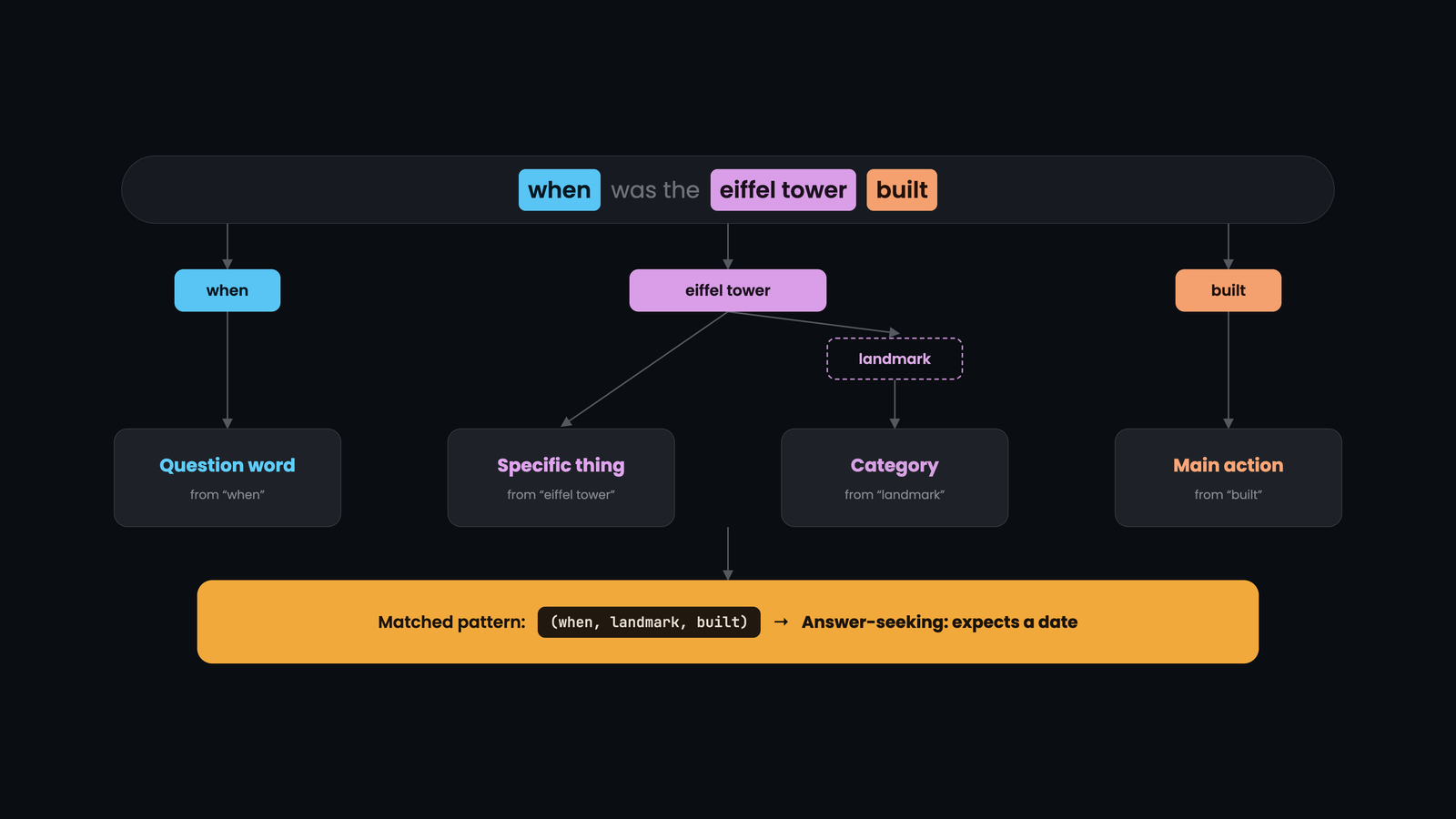
To find these patterns, Google breaks each question into building blocks the patent calls question elements. There are five main kinds:
| Building block | What it means | Example from "when was the eiffel tower built" |
|---|---|---|
| Question word | A known question word or phrase | "when" |
| Specific thing (entity) | A particular person, place or object Google knows | "Eiffel Tower" |
| Category of thing (entity class) | The group that thing belongs to | landmarks / buildings |
| Main action (root word) | The central word the rest of the question depends on | "built" |
| Word type (part of speech) | Grammar role, such as verb or noun | "built" is a verb |
Before doing any of this, the system tidies the question up. It strips filler words like "the", "is" and "to", drops some descriptive words, and reduces words to their base form, so "cooking", "cooked" and "cooks" all become "cook".
One question becomes many patterns
Here's the clever part. From one question, Google creates several question patterns at different levels of detail. The patent uses "how to cook lasagna" as its example. From that single seed query question, it can build patterns such as:
- (how, cook), which also matches "how to cook rice" or "how to cook steak"
- (how, cook, a dish), which matches any "how to cook [food]" question
- (how, a hobby, a dish), an even broader pattern covering many activities
Some patterns are broad and some are narrow. Scoring them across millions of examples helps Google find the right balance, so it can recognise questions it has never seen before.
Key insight: question words are optional
The patent says plainly that a query doesn't need to be phrased as a question, or contain a word like "how" or "why", to be treated as answer-seeking.
A search like "eiffel tower height" has no question word, yet it clearly wants one number. If the words match a known question pattern, Google can still treat it as answer-seeking.
Step 2: How Google Finds the Answer
Once a query is classified as answer-seeking, Google needs to find a passage worth showing. It does this by asking: what does a proper answer to this type of question usually look like?
Just as questions have question types, answers have answer types: patterns that good answers tend to share. A "when" question about a building is usually answered by a passage containing a date and a verb like "built" or "completed". A "how to" question is usually answered by a passage full of action verbs in a sequence.
The ingredients of a good answer
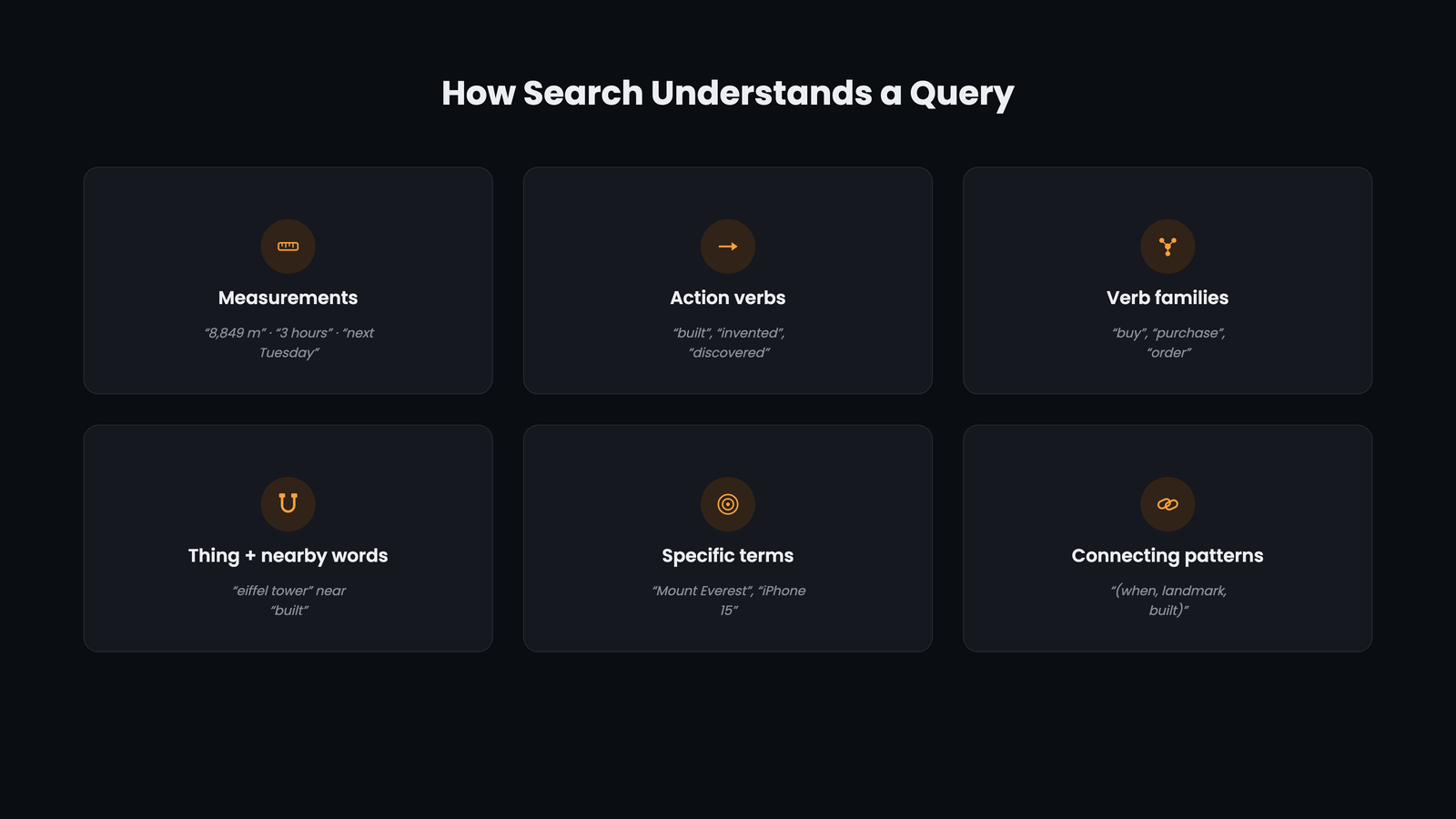
The patent lists the answer elements Google looks for. In plain language:
| Answer ingredient | What it looks like | Example |
|---|---|---|
| Measurements | Dates, numbers, sizes, durations | "1889", "8,849 metres", "10 minutes" |
| Action verbs | The verbs a proper answer uses | "built", "invented", "boil" |
| Verb families | Groups of verbs that mean similar things | mix, blend, combine, stir |
| The thing + nearby words | Key words appearing close to the subject | "The Eiffel Tower was completed in 1889" |
| Specific, uncommon terms | Precise words that rarely appear by chance | "Macworld", "photosynthesis", "toxic" |
| Small connecting patterns | Prepositions and short word patterns | "born in", "located on the" |
Proximity matters. The patent explains that a word counts as "near" the subject if it sits within a few words of it, in the same sentence, or in the same passage. Its own example is "Obama was born in Honolulu", where the specific word "Honolulu" sits just a few words from the person it describes.
How the winning passage is chosen
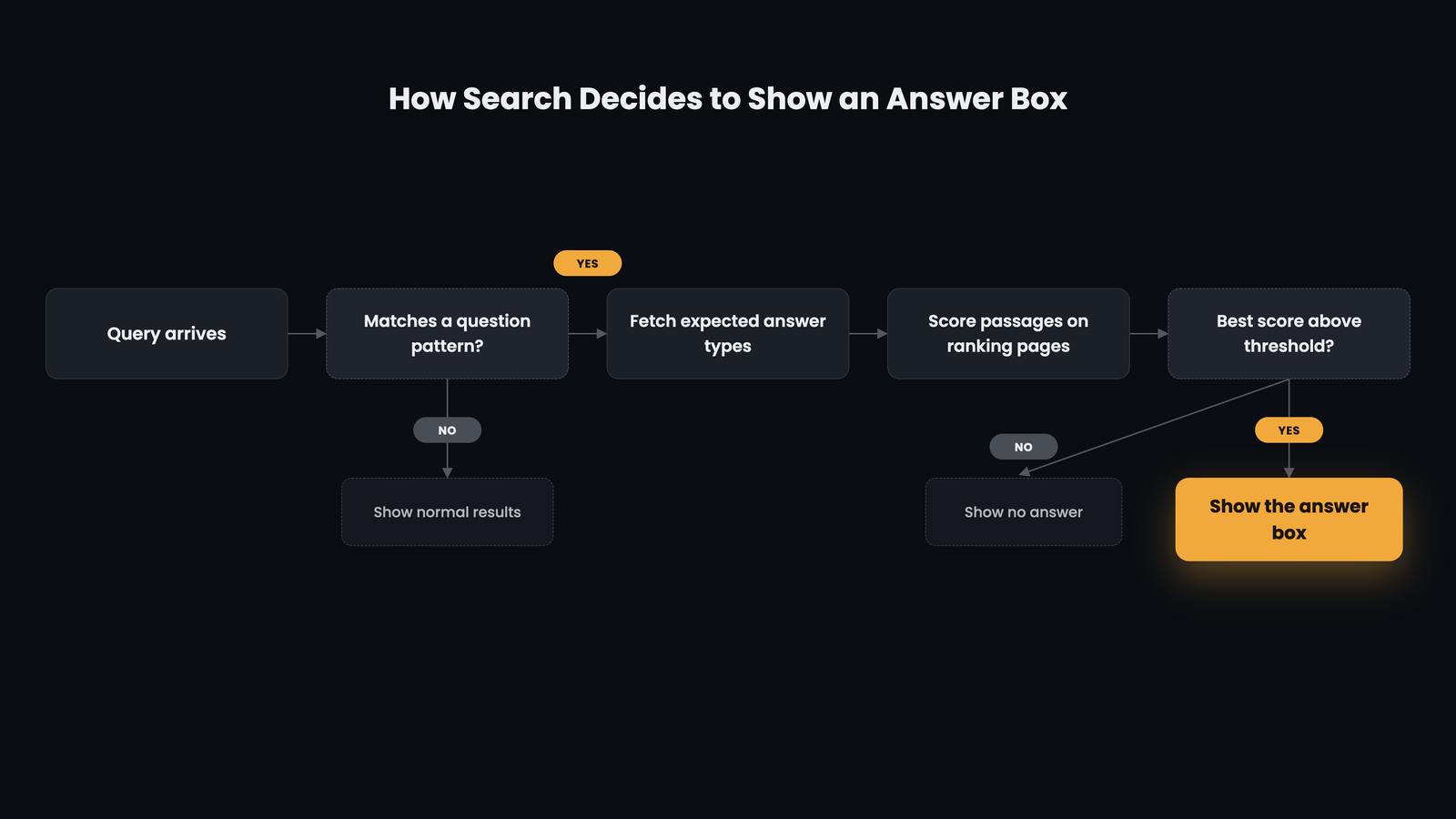
Here is the process the patent describes, step by step:
- Get the results. Google finds the pages that rank for the query.
- Check the question. If the query doesn't match any known question pattern, it isn't answer-seeking. Google shows normal results and stops there.
- Look up the expected answer types. For the matched question type, Google retrieves the answer types that have historically paired well with it.
- Score every passage. Passages on the ranking pages are scored by how many of those answer types they match. More matches means a higher score.
- Apply a quality bar. If the best passage clears a threshold, it's shown as the answer. If not, no answer is shown at all.
How does Google know which answer types go with which question types? It measures how often a given answer pattern appears alongside a question pattern, compared with how often it appears in general. A pattern that shows up far more often with a particular kind of question than it does at random is a strong signal. (For the technically curious, the patent names this measure: pointwise mutual information, or PMI.)
Three Surprising Truths Hidden in the Patent
Most articles stop at the definition. These three details are where the real value is, because each one challenges a common SEO habit.
1. The answer doesn't need to repeat the search words
In the patent's own example, the passage chosen as the answer doesn't contain the key word from the search query. It was chosen because it looked like the right kind of answer, not because it matched the words.
This is a direct blow to old-style keyword matching. Repeating the exact search phrase in every paragraph doesn't make a passage a better answer. Having the right ingredients does.
2. The answer can come from a page that isn't ranked first
In the same example, the answer was taken from the second search result, not the first. Ranking at the top and being chosen as the answer are two separate contests.
That's good news for smaller websites. You don't have to outrank everyone to have your words shown first. You need the clearest answer among the pages that rank.
3. Sometimes Google shows no answer at all
Because of the quality threshold, a query can be answer-seeking and still get no direct answer, simply because none of the ranking pages answered it well enough. Every one of those searches is an open opportunity for the first page that writes a genuinely clear answer.
Where Answer-Seeking Queries Show Up Today
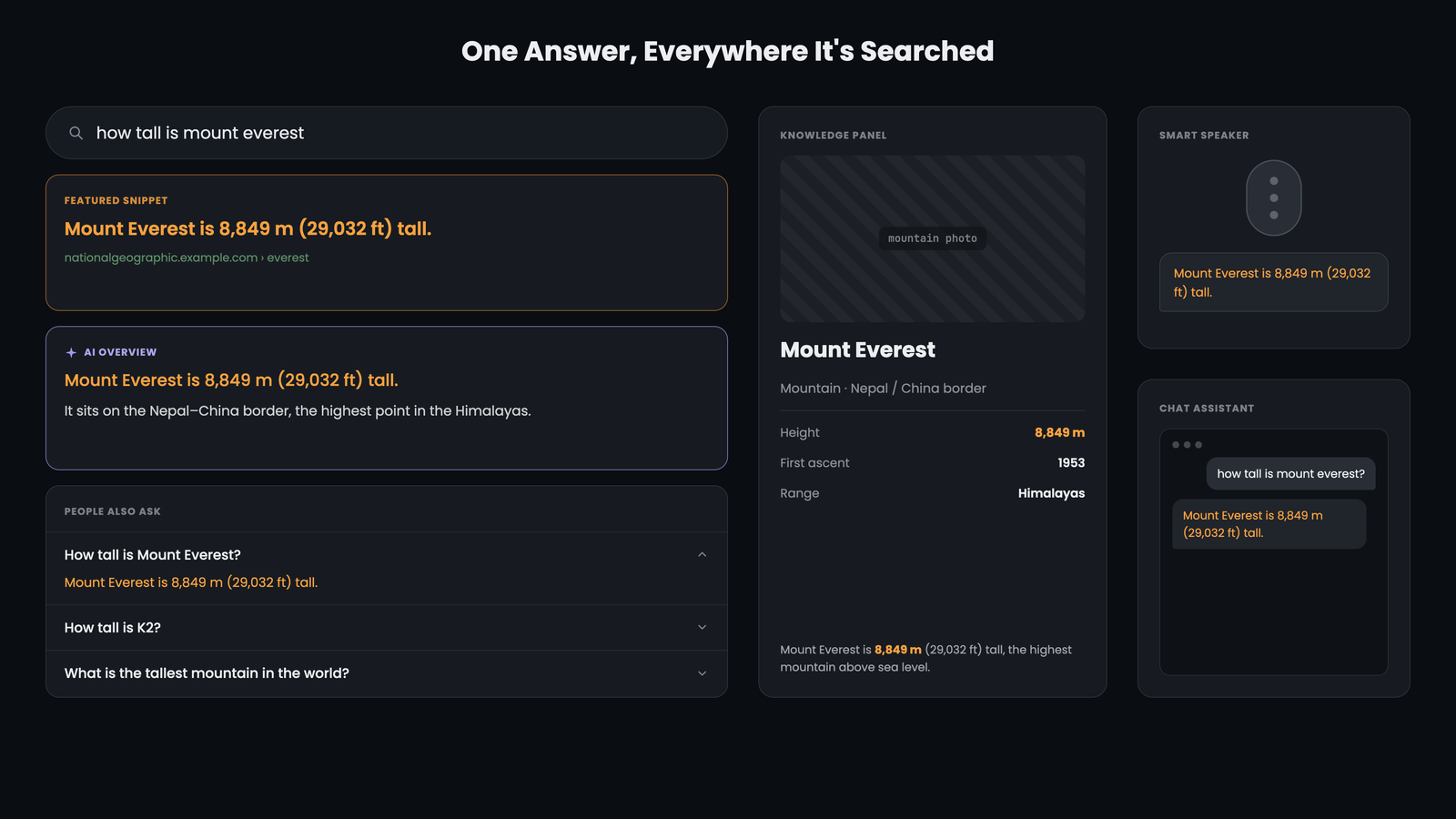
The patent describes a classic "answer box", but the same idea now appears across many search features:
- Featured snippets. The highlighted answer at the top of Google results, quoted from a web page.
- People Also Ask. Expandable questions (often related to follow-up questions), each answered with a passage from a page.
- Knowledge panels and direct answers. Facts about well-known people, places and things.
- Voice assistants. When you ask a smart speaker a question, it can only read out one answer. Answer-seeking queries are the backbone of voice search.
- AI-generated answers. Google's AI Overviews and AI Mode, along with Bing's Copilot answers, pull information from passages on web pages to compose a response.
- Bing's answer boxes. Bing shows its own direct answers for factual questions, also drawn from web content.
The principle carries across all of them: a passage that clearly and completely answers a question on its own is easier for any system to lift, quote and cite. Writing for answer-seeking queries isn't a trick for one Google feature. It's how you write for every engine that answers questions.
You may also see a closely related term in Google's Search Quality Rater Guidelines: "Know Simple" queries. These are informational searches with a short, specific answer that could fit in one or two sentences. It's the same idea seen from the human-reviewer side.
How to Write Content That Wins Answer-Seeking Queries
Everything above leads to a practical playbook. These rules apply whether you run a blog, a product site, a help centre or a news page.
1. Put the answer first
Answer the question in the first one or two sentences under the heading, ideally in 40 to 60 words. Add background, nuance and examples after that. Readers get what they came for, and machines find a clean passage to lift.
2. Keep the subject and the fact close together
Place the main subject and its answer in the same sentence, a few words apart. "The Eiffel Tower was completed in 1889" beats "Completed in 1889, it remains one of the most visited landmarks in Europe", where the subject is missing from the sentence entirely.
3. Match the shape of the answer
Give each type of question the answer format it expects:
| If the question asks... | Write the answer as... |
|---|---|
| When...? | A sentence with the subject, the action and the date |
| How much / how many / how tall...? | A sentence with the number and the unit |
| What is...? | A one-sentence definition: "[Term] is a [category] that [does what]" |
| How to...? | Numbered steps, each starting with an action verb |
| Can / is / does...? | Start with "Yes" or "No", then the reason |
| Who...? | The name, plus the role or achievement, in one sentence |
4. Use specific words, not filler
Precise terms are strong answer signals, because they rarely appear by accident. "Grapes contain compounds that can cause kidney failure in dogs" carries far more answer value than "Some foods may not be good for pets."
5. Write passages that stand on their own
Google scores passages, not whole pages. Each answer should make sense if lifted out and read alone. Avoid opening an answer with "As mentioned above" or "It" when "it" refers to something two paragraphs back.
6. Turn real questions into headings
Use the actual questions people ask as your H2 and H3 headings, then answer each one directly underneath. This creates clear question-and-answer pairs, the same structure Google's system was trained on.
7. Don't stuff the keyword
Remember truth number one: the answer doesn't need the exact search phrase. Write naturally. Cover the topic's real vocabulary, its related terms, verbs and specifics, instead of repeating one phrase.
8. Then go deeper than everyone else
A direct answer wins the snippet. Depth wins the click and the trust. After the short answer, add the context, examples and edge cases that make the page the best resource on the topic.
Before and After: Rewriting a Weak Answer
Here's the playbook in action for the query "when was the first iPhone released".
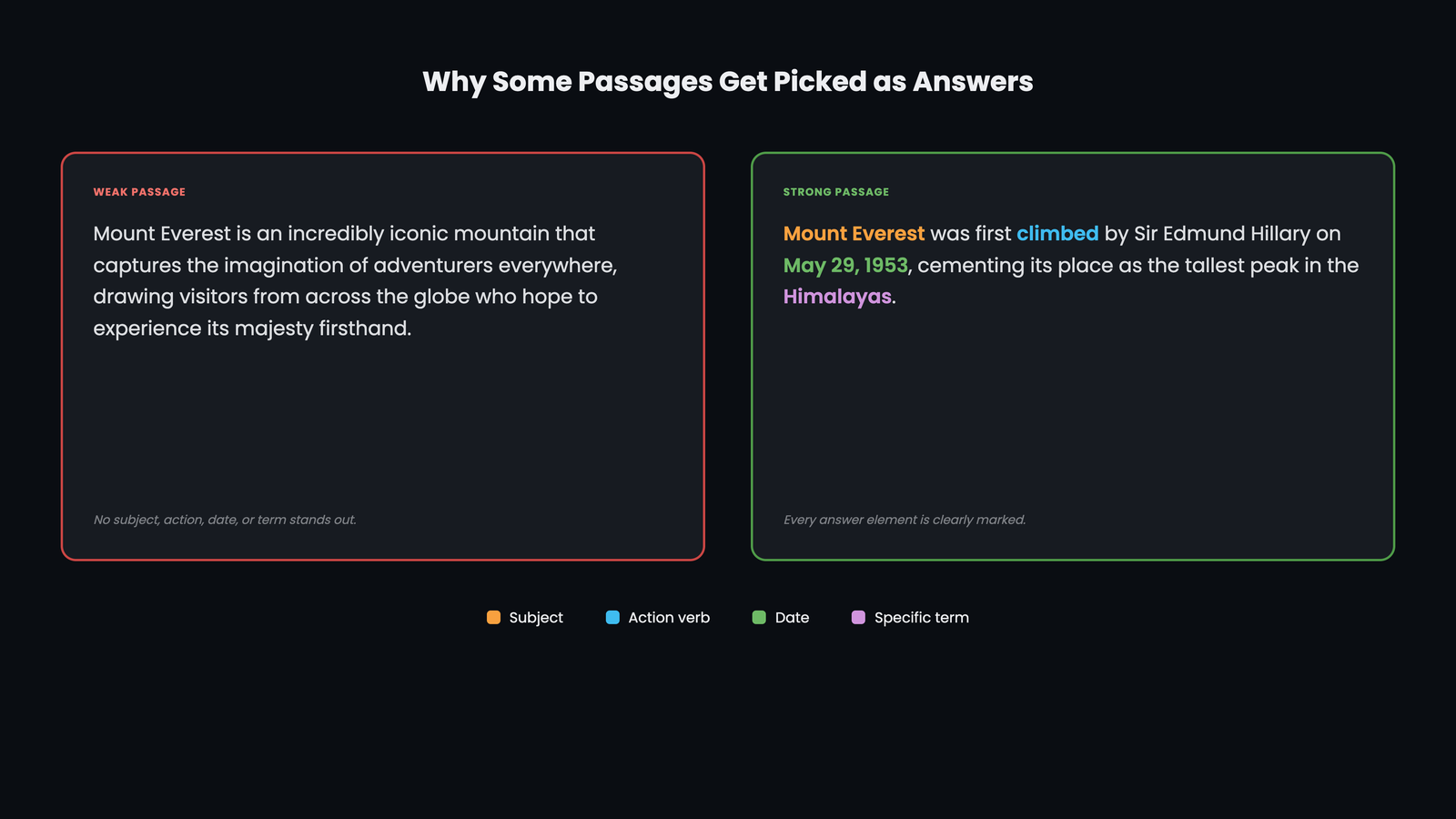
Weak passage
Apple has always been known as one of the most innovative companies in the world, and its famous smartphone changed the industry forever. Many people still remember the excitement around the launch and the long queues outside stores.
Why it fails: No date, no clear subject-action-fact sentence, and generic words that could appear anywhere. It reads well but answers nothing.
Strong passage
The first iPhone was released on June 29, 2007, in the United States. Steve Jobs had unveiled it at Macworld on January 9, 2007, describing it as a phone, an iPod and an internet device in one.
Why it works: The subject ("first iPhone"), action ("released") and measurement ("June 29, 2007") sit together in the first sentence. Specific terms like "Macworld" add confidence, and the passage makes sense on its own.
Answer-Seeking Queries vs Other Query Types
Answer-seeking is one way of classifying a search. Here's how it relates to other query types you'll come across in semantic SEO:
| Query type | What the user wants | Example |
|---|---|---|
| Answer-seeking | One short, direct answer | how many bones are in the human body |
| Entity-seeking | A specific person, place or thing to be identified | who directed inception |
| List-seeking | Several options to compare | best budget smartphones |
| Navigational | A particular website or page | gmail login |
| Transactional | To buy, download or sign up | buy wireless earbuds |
| Natural language query | A full, conversational question, which may or may not be answer-seeking | what's the easiest way to learn to swim as an adult |
These categories overlap. "Who directed Inception" is both entity-seeking (it wants a person) and answer-seeking (one short answer satisfies it). The useful question is always the same: what does the user expect to see, and can one passage give it to them?
Common Mistakes to Avoid
- Burying the answer. Three paragraphs of introduction before the actual answer. Readers leave, and machines struggle to find a clean passage.
- Writing vague answers. "It depends on many factors" without then giving the factors or a typical figure.
- Separating the subject from the fact. Splitting the key information across sentences so no single passage holds the full answer.
- Forcing direct answers onto list queries. "Best laptops for students" needs comparisons, not a one-line answer.
- Chasing the exact keyword. Repeating the search phrase instead of including the words a real answer contains.
Conclusion
Every search starts with a hidden question: does this person want an answer, or options? Google's answer-seeking query system makes that call first, then hunts across the ranking pages for the passage that looks most like a proper answer.
That changes the job of content. It isn't enough to rank. You need to be the clearest answer on the page: the subject and the fact side by side, in the format the question expects, written so the passage stands on its own.
Do that consistently, and your content becomes the answer people see first, whether they're searching on Google, Bing, a voice assistant or an AI chat.
Want your content to be the answer?
Pick five questions your customers ask most. Check who Google shows as the answer today. Then rewrite your own answers using the playbook above. If you'd like a hand finding the gaps, get in touch.
Frequently Asked Questions
What is an answer-seeking query in simple words?
It's a search where the person wants one short, direct answer, like a date, number, definition or yes/no, rather than a list of websites to browse.
Does a query need a question word to be answer-seeking?
No. Google's patent states that a query doesn't need to be phrased as a question or include words like "how" or "why". "eiffel tower height" is answer-seeking even without a question word.
Is an answer-seeking query the same as a featured snippet?
No. The answer-seeking query is the search itself. A featured snippet is one of the ways Google can respond to it by showing an answer from a web page.
Do I need to rank #1 to be shown as the answer?
No. In the example in Google's patent, the answer was taken from the second result. Google picks the passage that best matches the expected answer type among the pages that rank.
Why does Google sometimes show no direct answer?
If none of the ranking pages contains a passage that scores well enough as an answer, Google can decide not to show one. Those gaps are opportunities for clearer content.
Does this apply to Bing and AI search too?
Yes, in principle. Bing shows its own answer boxes, and AI tools like Google's AI Overviews and Bing's Copilot build answers from passages on web pages. Clear, self-contained answers are easier for all of them to use and cite.