Google Search Console is one of the most powerful free tools from Google that help website owners, bloggers and SEO experts to monitor their site performance in Google search. Apart from tracking keywords, impressions and clicks, one important feature available is URL removal tool. Many beginners don’t know why and when to use it. In this blog, I am going to explain how to remove a URL in Google Search Console and also why we remove URL from search results.
STEP 1:Login To Your Google Search Console Account
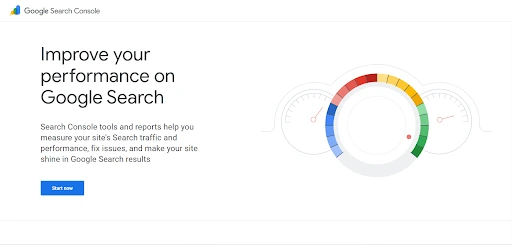
Then You Can See a Dashboard Like This
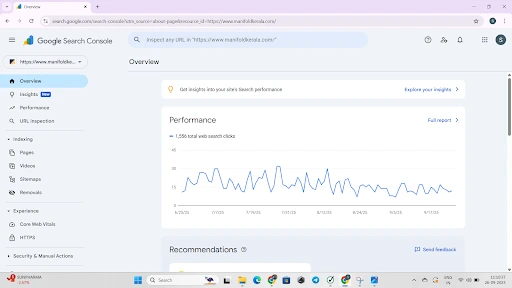
STEP 2:Click On The Removals On The Left Task Bar
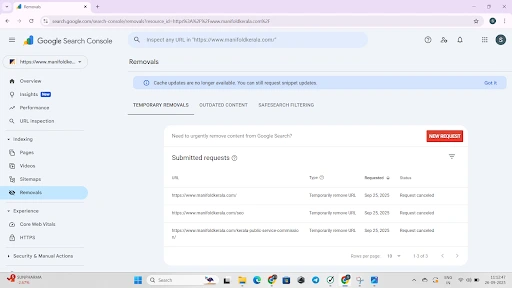
Now We Can See A Interface Like This,Then Click On The New Request Temporary Removals Page
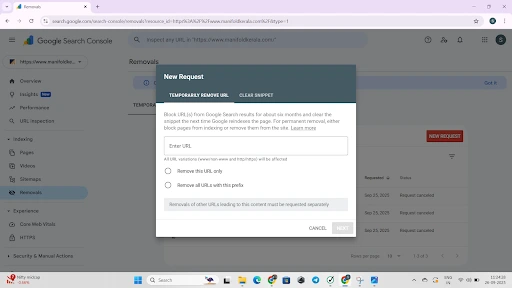
When you request a temporary URL removal in Google Search Console, you’ll get two choices:
- Remove this URL only – This option hides only the exact URL you entered. For example, removing example.com/page1.html won’t affect example.com/page2.html. This is useful when you just want to hide a single page.
- Remove all URLs with this prefix – This option hides all URLs that begin with the prefix you typed. For example, removing example.com/blog/ will hide every post under /blog/. This is useful when you want to remove an entire section or category from search results.
Why We Remove URLs in Google Search Console
Sometimes you don’t want all your webpages to appear in Google search. There can be different reasons for that. Few common reasons are:
- Outdated Content – You might have an article or page which is old and not useful anymore. Showing old pages to users can create confusion.
- Sensitive or Wrong Information – By mistake if you uploaded private data, phone numbers, or any content that should not be public, it is better to remove it quickly.
- Duplicate Content – Having multiple similar pages can hurt your SEO ranking. Removing duplicate pages help search engine to focus on the best one.
- Temporary Pages – Sometimes we create test pages or event landing pages that are only required for short time. After the event ends, you can remove it from Google search.
- Website Restructure – If you are redesigning your website or changing categories, you may want to hide old sections until new pages are ready.
So the main use of removing URL is to keep your site clean in Google search and give the right information to the users.
Advantages Of Removing URL In Google Search Console
- Improve user experience by showing only fresh and updated content.
- Protect your site reputation by hiding wrong or sensitive information.
- Help SEO by avoiding thin content or duplicate pages.
- Make your site more professional by cleaning up old sections that no longer matter.
Conclusion
Removing URLs in Google Search Console is a very useful feature that every website owner should know. It gives you control on what content you want to appear in Google search results. Always remember this is not a permanent delete, it is just a temporary hide for around six months. But in that period, it can save you from big issues like showing wrong information, duplicate content or exposing sensitive data. Use it wisely, choose between remove single URL or remove prefix, and keep your site healthy in Google eyes.
Frequently Asked Questions
Does removing a URL in Google Search Console delete the page from my site?
No, it dont delete the page from your website. It only hide it from Google search results for around 6 months. The page will still work if somebody have the link directly.
Can I bring back a removed URL before 6 months?
Yes, you can. If you allow crawling again and remove any block, Google may index it back. But remember it may take some time.
Is URL removal permanent?
No, it is temporary only. For permanent delete you should use noindex tag, robots.txt or delete the page completely.