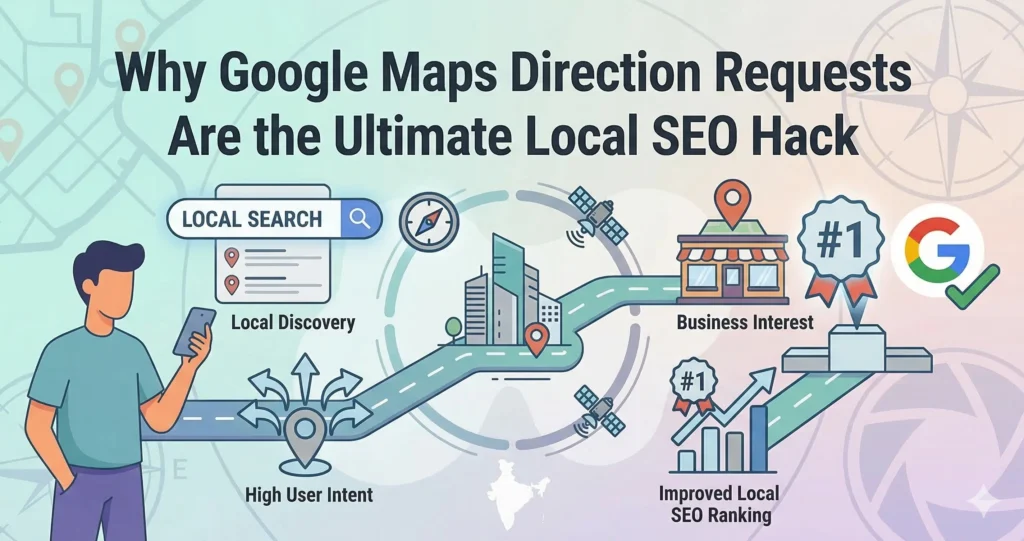
Why Google Maps Direction Requests are the Ultimate Local SEO Hack
Most business owners in Kerala focus all their energy on two things: stuffing keywords into their profiles and begging for 5-star reviews. While reviews are important, they miss the biggest shift in local SEO. Google is no longer just looking at what you say about your business; it is tracking what customers actually do. This brings us to the most powerful, underrated ranking signal in 2026: Google Maps Direction Requests. 1. Quick Answer: Why Do Direction Requests Matter? If you want to jump to the top of the Google Maps “Local 3-Pack,” you need more people clicking “Directions” on your profile. Why does Google care? Real-World Intent: Anyone can browse a profile, but asking for directions proves someone is physically traveling to spend money. Location Trust: It tells Google your map pin is accurate and safe to send other users to. Popularity Signal: It proves you are a highly relevant destination, helping Google choose you over nearby competitors. “Near Me” Dominance: Consistent direction requests build your relevance within a specific 10 to 20-mile radius. The formula is simple: More direction requests = stronger engagement signals = better local rankings. VIRAL CASE STUDY 2. How Direction Requests Impact Your Ranking (The Holly Starks Case Study) To understand how heavily Google weighs this behavioral signal, we need to look at a famous (and wild) black-hat SEO case study involving an expert named Holly Starks. To test the algorithm, she placed 100 cell phones in her car, turned on driving directions to a specific business, and physically drove the route. The result? That business jumped from ranking in the 20s straight to Number 1 on Google Maps. Obviously, you are not going to drive around Kochi with 100 phones in your trunk. But this proves a massive point: Because Google Maps functions as a logistics and routing engine, real-world driving data directly manipulates your navigational ranking. 3. Step-by-Step: 5 Ways to Get More Direction Requests You don’t need black-hat tactics to boost your numbers. Here is how hybrid and local businesses in Kerala can legally farm these powerful signals. Step 1 Steal Your Direct “Directions” Link First, you need the exact URL that triggers a route to your business. Google your business name. In the Knowledge Panel, click on “Directions.” When the map opens, copy the URL from the address bar. This link automatically sets your business as the destination. Step 2 Add it to SMS and Email Reminders Stop sending boring appointment confirmations. If you run a dental clinic or salon in Calicut, update your automated texts: “Your appointment is confirmed for 2 PM. Click here for easy driving directions and add a CTA Button.” Step 3 Upgrade Your Website’s Contact Page Traditional, static embedded maps are outdated. Instead, add a massive, eye-catching button on your mobile site that says “Get Driving Directions.” Link this directly to the URL you copied in Step 1. Make sure it opens the Google Maps app automatically on their phone. Step 4 The QR Code Strategy for Retail If you do direct mail marketing, print flyers, or have a billboard, add a Dynamic QR Code that instantly launches Google Maps for precise store navigation. This removes the friction of typing your name and guarantees a mobile direction request. Step 5 The “Staff Routing” SOP (For Service Businesses) If you run a pest control or HVAC company where technicians are dispatched from a central office: Make it a rule that staff must use Google Maps to navigate to and from every single job. Routinely starting these routes logs consistent direction data, strengthening your relevance across your entire service area. 4. Technical Optimization (Advanced Local SEO) The “Visual” Direction Hack According to Google’s own data, businesses that regularly upload photos to their profile receive 42% more requests for driving directions than those that do not. If your profile looks abandoned, users will not click “Directions.” Ensure your profile is fully optimized with authentic, well-lit photos to naturally encourage more searchers to route to your location. (Learn more about visual optimization in my guide on Why Photos Rank Higher on Google Maps. Map Embeds and Link Juice Use “Google My Maps” to create a custom map. Drop a marker on your main business location, and add markers for different neighborhoods you serve (e.g., Edappally, Vyttila, Kakkanad). Add driving directions from your main location to each of these points. Embedding this custom map on Web 2.0 sites or neighborhood-specific landing pages passes powerful local relevancy “link juice” back to your entity. 5. Common Mistakes Businesses Make Having the wrong map pin: If your pin is on the street instead of your building’s roof, customers will get lost, cancel the route early, and Google will drop your ranking for providing a bad user experience. Telling people to “Call us for directions”: Stop doing this! Train your staff to say, “I will WhatsApp you a direct Google Maps link right now.” Ignoring the CTA in GBP Posts: When you create an update or offer on your Google Business Profile, always use “Get Directions” or “Book” as the call-to-action button, not just “Learn More.” . Conclusion Driving directions are one of the most underrated local ranking signals available to business owners today. By moving beyond simple keyword optimization and actively encouraging your users—and your own team—to navigate via Google Maps, you build a massive competitive advantage. Small actions, like texting a link or scanning a QR code, translate into huge local SEO impacts. Is your business struggling to capture local foot traffic? A poorly optimized profile won’t get clicks, no matter how many links you send. Contact me for a comprehensive Google Business Profile Audit to make sure you are ready to dominate the map pack. FAQ Section Will fake direction requests from bots help my ranking? No. Google tracks the physical GPS movement of the device. If an IP address requests directions but the phone’s GPS doesn’t physically travel the route, Google’s spam filters will catch it and potentially suspend your